
SWYFT Solutions offers Support and Success plans designed to help clients get the most from their engineering tools:
SWYFT Support provides reactive assistance to help keep your team operational by troubleshooting issues, answering questions, and resolving technical problems.
SWYFT Success provides reactive assistance and is focused on user development, adoption, optimization, and continuous improvement through coaching, training, and strategic guidance.
The resources outlined below are available based on the service plan included with your subscription.
If you did not add SWYFT Support/Success during your initial software purchase and would like to learn more about expanding your available services, please contact your SWYFT representative or reach out to the SWYFT Team at sales@swyftsol.com and we will help direct you to the appropriate resource.
SWYFT Support
Our support team is available to help resolve issues, answer questions, and ensure your systems remain operational.
If you require assistance, you can contact the SWYFT Support Team using the following methods:
Email
support@swyftsol.com
Phone
616-631-3044
Online
https://www.swyftsol.com/support
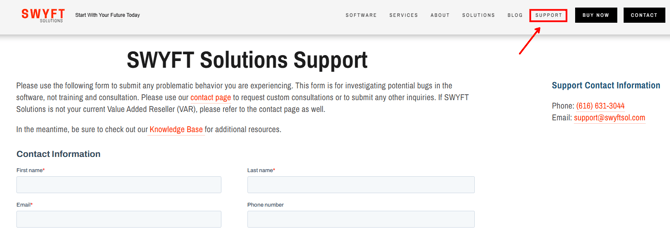
Support is available to help troubleshoot issues, provide guidance, and ensure you remain up and running.
SWYFT Success
In addition to reactive support you gain access to with the SWYFT Support plan, the SWYFT Success program provides additional resources designed to help your team develop new capabilities and improve effectiveness.
Self-Paced Training – Pinnacle Series
Pinnacle Series provides self-paced training designed to help users build skills and deepen their understanding of SOLIDWORKS.
NOTE: Activation is available upon request. Contact your SWYFT representative when you are ready to activate this training benefit.
If you are unsure of who to contact, reach out to our support team (support@swyftsol.com) to point you in the right direction.
Weekly Coaching Program – SOLIDWORKS Elite Coaching
SOLIDWORKS Elite Coaching provides ongoing live coaching sessions designed to help teams improve how they use SOLIDWORKS and related tools.
These weekly sessions focus on practical skills, workflow improvements, and best practices used by experienced professionals.
Topics may include:
-
SOLIDWORKS modeling techniques and best practices
-
Workflow optimization and efficiency improvements
-
Design automation and advanced tools
-
Real-world problem solving and troubleshooting
Participants can attend sessions relevant to their needs, ask questions, and learn from both instructors and other professionals.
NOTE: Activation is available upon request. Contact your SWYFT representative when you are ready to activate this coaching benefit.
If you are unsure of who to contact, reach out to our support team (support@swyftsol.com) to point you in the right direction.
Instructor-Led Training Credit
Clients with a SWYFT Success plan receive a $500 credit toward any SWYFT Solutions Instructor-Led Training.
This credit can be applied to approved training courses offered by SWYFT Solutions.
Custom Consultation Sessions
Each organization receives: Two (2) custom consultation sessions per year
These sessions can be used to:
-
Discuss optimization strategies
-
Review workflows and processes
-
Plan system improvements or new initiatives
-
Address strategic questions about tools in the SOLIDWORKS portfolio
NOTE: Sessions are scheduled upon request. Contact your SWYFT representative to discuss the agenda and timeline.
If you are unsure of who to contact, reach out to our support team (support@swyftsol.com) to point you in the right direction.